Overview
Final project for the DevOps bootcamp. It sets up cloud infrastructure using Infrastructure as Code (IaC):
- Terraform — creates the AWS infrastructure
- Ansible — configures the servers
- Docker — runs the monitoring stack (Prometheus + Grafana) and the web app
Repository Layout
The monorepo holds the whole pipeline — infrastructure, config, the web app, and the docs-sync tooling:
| Path | Purpose |
|---|---|
terraform/ |
AWS infrastructure (VPC, security groups, 3 EC2 instances, autogenerated Ansible inventory) |
ansible/ |
Server setup (playbooks, Prometheus scrape config, Docker Compose stack) |
app/ship/ |
The "ship" web app — a Vite + Three.js microsite, containerised and served on node3 |
scripts/sync-docs.mjs |
Docs sync engine that keeps README.MD ⇄ index.html in sync |
package.json |
Root tooling for the docs sync |
.github/workflows/ |
CI/CD: commit-pipeline.yml (docs sync) and static.yml (Pages deploy) |
index.html |
GitHub Pages entry point, regenerated from this README |
Quickstart
From a clean checkout on main:
git clone git@github.com:Darkveda05/devops-bootcamp-project.git
cd devops-bootcamp-project

# 1) Provision the infrastructure
cd terraform
terraform init
terraform apply -auto-approve   # creates VPC, security groups, 3 EC2, writes inventory.ini

# 2) Configure the servers with Ansible
cd ansible
ansible-playbook playbook-web.yaml        # pulls the web image from ECR, runs it on node3
ansible-playbook playbook-stack.yaml      # Prometheus + Grafana on node1
ansible-playbook playbook-exporter.yaml   # node_exporter on all nodes
Access:
- node3 — the public web node, reachable via its public IP.
- node1 / node2 — on the private subnet; connect over SSM (
aws ssm start-session --target <instance-id>) or via SSH from within the VPC.
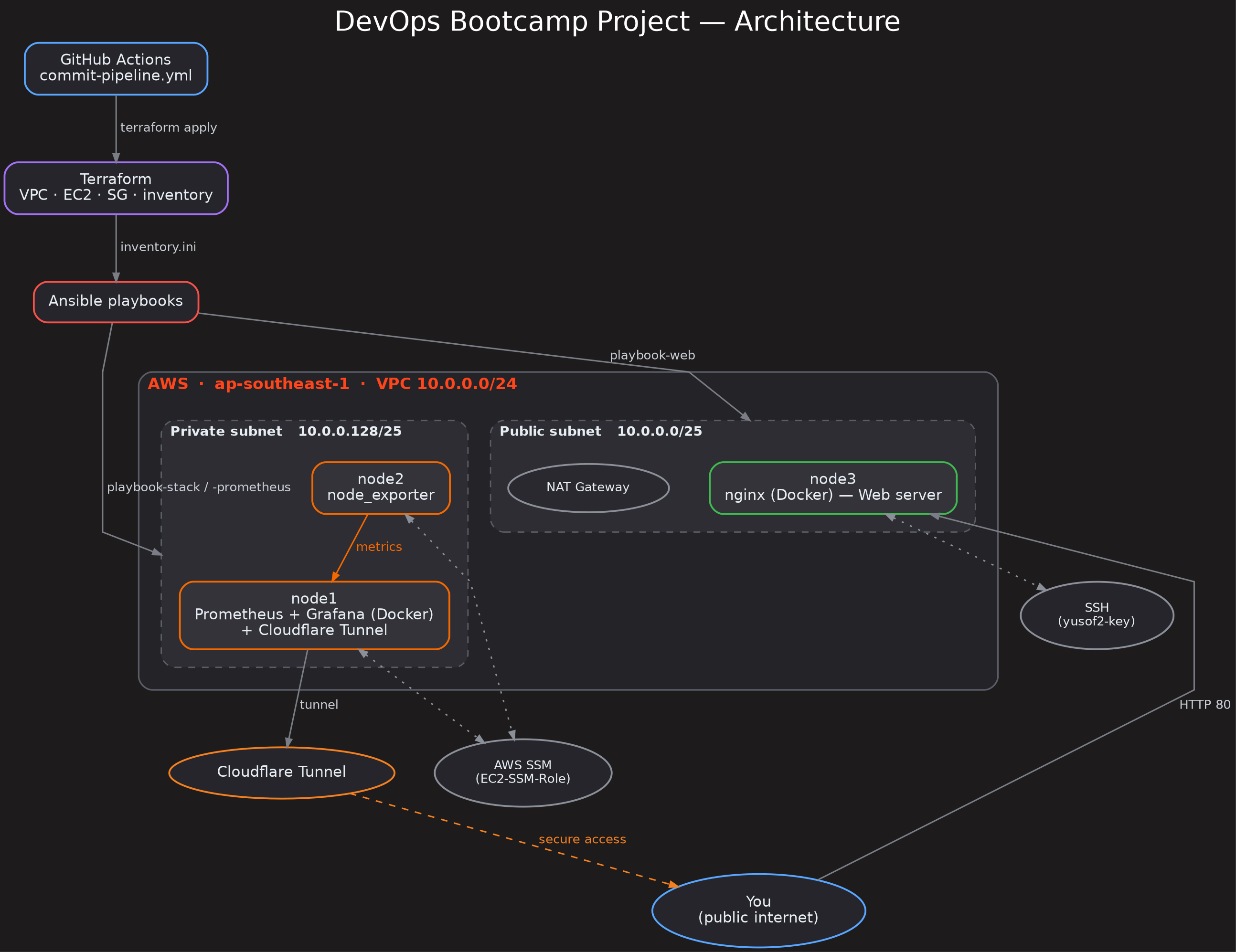
Architecture
- AWS region:
ap-southeast-1 - VPC:
10.0.0.0/24with a public subnet (10.0.0.0/25) and a private subnet (10.0.0.128/25), plus one NAT gateway - 3 EC2 nodes (t3.small, Ubuntu 24.04, 16GB disk):
- node1 — private subnet (runs Prometheus + Grafana via Docker, Cloudflare Tunnel for access)
- node2 — private subnet (runs node_exporter)
- node3 — public subnet (runs the web app container in Docker)
- Access: SSM (
EC2-SSM-Role) and SSH (keyyusof2-key)
Terraform — Create the Infrastructure
Main files in terraform/:
| File | Purpose |
|---|---|
providers.tf |
AWS provider, S3 backend (devops-bootcamp-terraform-yusof, key final-project/terraform.tfstate) |
network.tf |
VPC (terraform-aws-modules/vpc), public/private subnets, single NAT gateway |
security.tf |
Public SG (HTTP 80/0.0.0.0, SSH 22/VPC) and private SG (SSH 22/VPC, node_exporter 9100/VPC, Prometheus 9090 + Grafana 3000 from your public IP via ifconfig.me) |
ec2.tf |
3 EC2 instances (Ubuntu 24.04 AMI, SSM role, user_data) |
inventory.tf |
Generates inventory.ini for Ansible from the nodes' private IPs |
output.tf |
Exposes the nodes' IPs and ready-to-run aws ssm start-session commands |
userdata.sh |
Installs Docker + adds user to docker group |
userdata-tunnel.sh |
Installs Docker + runs Cloudflare Tunnel on node1 (token from SSM param /devops-bootcamp-2026/tunnel-token) |
Security groups:
- Public SG (
tf-vpc-sg) — allows HTTP (80) from anywhere and SSH (22) from within the VPC. - Private SG (
tf-vpc-sg2) — allows SSH (22) and node_exporter (9100) from within the VPC, plus Prometheus (9090) and Grafana (3000) from your current public IP (resolved at apply time viahttps://ifconfig.me/ip).
How to run:
cd terraform
terraform init
terraform apply -auto-approve
Ansible — Configure the Servers
Inventory: terraform/inventory.ini (generated by Terraform). Settings are in ansible/ansible.cfg.
| Playbook | Host | Purpose |
|---|---|---|
playbook-web.yaml |
node3 | Logs into ECR, pulls the web image, runs the web container on port 80 (removes any stale containers first) |
playbook-stack.yaml |
node1 | Runs Prometheus + Grafana via Docker Compose (geerlingguy.docker role) |
playbook-prometheus.yaml |
node1 | Installs Prometheus (scrape config in the playbook) |
playbook-exporter.yaml |
nodes | Installs node_exporter (prometheus.prometheus.node_exporter role) |
Web server (node3)
playbook-web.yaml is the current deployment path: it installs the AWS CLI if needed, logs in to Amazon ECR and pulls
569215999117.dkr.ecr.ap-southeast-1.amazonaws.com/devops-bootcamp/final-project-yusof:latest, then runs it as the web
container on port 80 with restart: unless-stopped. Any earlier container already bound to port 80 is removed first.
ansible/compose-web.yaml is a lighter, static-nginx alternative (mounts html/ and default.conf) that maps port 80.
Monitoring stack (node1)
playbook-stack.yamlcopiesprometheus.yamlandcompose.yamlto/opt/monitoringand runsdocker compose up -d.compose.yaml— Prometheus (9090:9090) + Grafana (3000:3000), with agrafana-datavolume.prometheus.yaml— scrape config for Prometheus itself (localhost:9090) and node_exporter on each node's private IP.
Application — app/ship
The ship web app (app/ship/) is a Vite + Three.js "launchpad" microsite — a customizable 3D spaceship plus a
telemetry HUD, and the thing the pipeline builds, checks, and deploys. It has its own self-contained app lifecycle.
Customize it
Edit app/ship/ship.config.json — the only file you need to touch:
{
  "shipName": "Nebula Runner",
  "color": "#22d3ee",
  "shipModel": "fighter",
  "emblem": "comet"
}
shipName— up to 24 characters.color— a hex colour or a colour name (red,emerald,cyan,violet,rose,white, …) that recolours the ship and accents.shipModel— one offighter,interceptor,hauler,scout(Quaternius CC0 models, seeCREDITS.md).emblem— one ofcomet,bolt,star,ring,delta,phoenix.
The callsign is your GitHub username, set automatically at build time. The telemetry HUD shows the ship class spec and this build's deploy facts (callsign, commit SHA, build time) — the pipeline made visible on your own ship.
Containerise & deploy
app/ship/Dockerfile is a multi-stage build: build with node:20-alpine (npm ci → npm run build), then serve the
static dist/ with nginx:alpine on port 80. app/ship/.github/deploy.yml builds, tests, and deploys the app to its own
GitHub Pages site. The ECR-based playbook-web.yaml above ships this same image to node3.
Run it locally:
cd app/ship
npm install
npm run dev        # live preview
npm test           # pre-flight gate — aborts if ship.config.json is invalid
npm run build      # static site → dist/
npm run preview    # serve the built site on :8080
Prerequisites
- Terraform 1.15+
- Ansible + galaxy roles:
geerlingguy.dockerprometheus.prometheus.prometheusprometheus.prometheus.node_exporter
- AWS CLI and AWS credentials (plus
aws ecr get-login-passwordaccess for the web deploy) - SSH key
~/.ssh/id_ed25519
Git Branch History
The project was built up feature-by-feature on topic branches before being merged into main:
| Branch | Purpose |
|---|---|
terraform |
Initial Terraform configuration (VPC, network, EC2, inventory) |
ec2 |
EC2 instance provisioning and key/AMI tweaks |
ansible |
Ansible configuration and plays |
docker |
Docker Compose + app containerisation (also folded app/ship into the repo) |
grafana |
Grafana/Prometheus monitoring setup |
main |
Integration branch; hosts the docs-sync CI/CD and GitHub Pages site |
CI/CD (GitHub Actions)
Two workflows live in .github/workflows/:
| Workflow | Purpose |
|---|---|
commit-pipeline.yml |
Syncs README.MD and index.html |
static.yml |
Deploys the repo to GitHub Pages (which serves index.html) |
Docs sync — README.MD ⇄ index.html
The pipeline monitors changes to the docs and keeps both files in sync:
- When
README.MDchanges →index.htmlis regenerated from it (cards are derived from each##section). - When
index.htmlchanges →README.MDis regenerated from the card content. - If both change →
README.MDwins andindex.htmlis regenerated from it.
The content window of index.html lives between <!-- SYNC:START --> and <!-- SYNC:END --> (the hero, styles, and footer stay untouched). Once synced, the generated file is auto-committed back to main by the github-actions[bot], and the push triggers a Pages redeploy via static.yml, so the site always reflects the README.
Run the sync locally at any time:
npm install        # first time only
npm run sync:docs  # dry-run (shows what would change)
npm run sync:docs -- --write  # persist changes
Notes
terraform/.terraform, state files, and environment variables are excluded in.gitignore- The private security group only allows Prometheus/Grafana access from your current public IP (detected via
ifconfig.me) - The public web node (node3) serves the
shipweb app from ECR; the "index.html" served there is generated by the Vite build, not by this repo's sync - The GitHub Pages site (
index.html) is kept in sync with this README automatically bycommit-pipeline.yml - After auto-committing synced docs, the pipeline dispatches a Pages redeploy so the site updates immediately
Architecture Diagram
View the repository on GitHub